djehooty-backend
djehooty-backend is the server component of Djehooty. It is responsible for the business logic, data management, and exposing an API that the frontend and other clients can use to interact with the core of Djehooty.
It is developed in Go and uses a SQLite database. Its source code is available on Codeberg.
Versions
There are two versions of djehooty-backend:
| Versions | Backend | Frontend | Recommended | |
|---|---|---|---|---|
| djehooty-backend-standalone | ✅ | ✅ | ✅ | |
| djehooty-backend | ✅ |
djehooty-backend-standalone
A standalone application that integrates both the backend and the frontend.
It is designed to be used locally on a personal computer, without requiring any special configuration. It is ideal for testing Djehooty or for individual use. It is the recommended installation for most users.
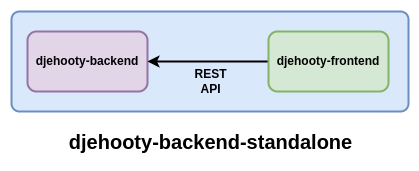
djehooty-backend-standalone automatically opens your web browser at http://localhost:3000.
djehooty-backend
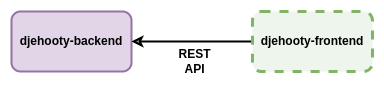
A server application that contains only the backend and exposes only the REST API, without an integrated client. It is designed to be deployed on a server or used during development. This version requires a separate client and is intended for experienced users.
Usage
Both versions are launched the same way:
- Linux
- Windows
- MacOS
djehooty-backend-standalone
./djehooty-standalone-linux-amd64
Your web browser will automatically open at http://localhost:3000.
CTRL+C allows you to stop Djehooty.
djehooty-backend
./djehooty-backend-linux-amd64
No interface opens. A separate client must connect to the REST API to interact with the server.
CTRL+C allows you to stop Djehooty.
This operating system is not yet supported.
This operating system is not yet supported.
Configuration
User Directory
The User Directory folder contains the configuration, database, and user files for Djehooty.
By default, this folder is set to ~/Djehooty on Linux.
When it does not exist, the User Directory is created on the first server startup.
User Directory Contents
| File / Folder | Description |
|---|---|
| config.yaml | Djehooty configuration file |
| djehooty.db | Djehooty SQLite database |
| files | Folder containing all your imported files |
| Temp | Temporary folder |
| thumbnails | Folder containing thumbnails generated from your files |
Changing the User Directory
You can change the User Directory to another folder of your choice using the --userdir option.
- Linux
- Windows
- MacOS
./djehooty-backend --userdir ~/Documents/Djehooty
This operating system is not yet supported.
This operating system is not yet supported.
Configuration file (config.yaml)
djehooty-backend automatically looks for the config.yaml file in the User Directory to load various parameters at server startup. When config.yaml does not exist, the default settings are loaded automatically without creating a file.
To modify djehooty-backend settings, if it does not already exist, create a config.yaml file at the root of the User Directory.
Port
You can change the port number if the default value does not suit you.
port: 8181
Development
You can enable development mode with dev_mode.
The dev_latency_ms option allows you to introduce a latency in the response of all REST API endpoints.
dev_mode: true
dev_latency_ms: 1000